Laravel Updates Without Downtime: How We Changed Our Deployments
How we moved our Laravel deployments to rolling updates with Coolify: no more downtime and no more lost sessions during releases.
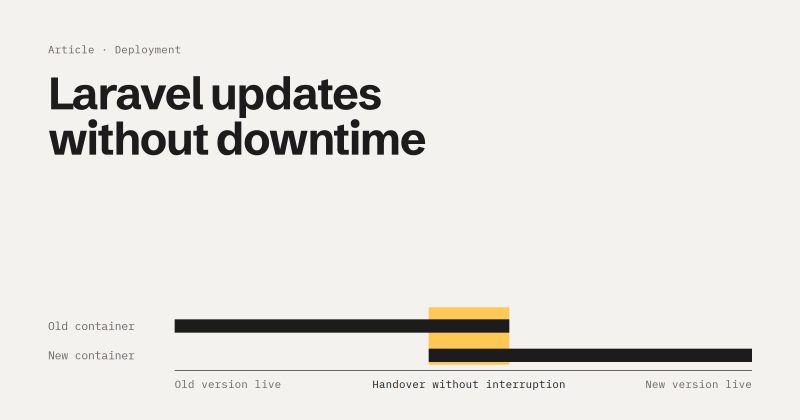
Every deployment used to mean the same thing for us: the application went down for a moment. Sometimes for a few seconds, sometimes for up to a minute. For an internal tool that might sound harmless, but for the people working with it at that moment, it isn't. In this article, I'll describe what our deployment process used to look like, why it caused problems, and how we now ship with zero downtime using Coolify.
How it used to work
Our setup was a classic combination of GitLab CI and Docker. The pipeline was limited to specific branches, in our case the testing and main branches. As soon as a change was merged into one of them, a runner would:
- build the Docker image,
- install the dependencies,
- build the frontend,
- push the finished image to our Docker Hub repository.
After that, the runner sent a webhook to our server. For this to work, a port had to be open on the server, with a deployment script listening behind it. That script pulled the latest image, stopped and restarted the containers, and then ran the usual commands: migrations, config cache, storage link and so on.
The problem
Between "old container stopped" and "new container ready" there was a gap. During that time, the application was unreachable, from a few seconds up to a minute, depending on the deployment.
Worse than the downtime itself was what it meant for users: anyone in the middle of something lost their session and had to start over. When that happens halfway through a long form, it's more than just annoying.
On top of that, we had an open port on the server just so the pipeline could trigger deployments. That's additional attack surface you'd rather not have.
How it works today
Today we use Coolify. For us as developers, almost nothing has changed: we push to testing or main, and the deployment starts.
Behind the scenes, though, things are different. Coolify builds the image directly on the server, so there's no detour through Docker Hub anymore. It then runs a rolling update:
- The new container is started with the new image.
- The old container keeps running and handles all requests in the meantime.
- Coolify checks whether the new container is healthy.
- Only then does the proxy start routing new requests to the new container.
- Finally, the old container is stopped and removed.
At no point is there a moment when no container is accepting requests. For users, the update goes unnoticed.
The best part: I barely had to build any of this myself. Coolify handles the traffic switch automatically.
Database migrations
Migrations run during the deployment in the new container, once the image has been built. That way, the database is up to date before the new container takes over the traffic.
Running jobs and queues
What happens to jobs that are still being processed when the old container is stopped? This is where the base image from Server Side Up helps. It supports a graceful shutdown: before the container stops, it gets time to finish ongoing work. In our case, that's [30] seconds. A job that's currently running isn't cut off immediately in the middle of its work.
What can go wrong: external dependencies
Once, we couldn't deploy at all. During the image build, a dependency was supposed to be cloned, and it simply wasn't reachable. No dependency, no image. No image, no deployment.
My takeaway: a deployment shouldn't depend on every external source being available at exactly the right moment. The versions are pinned in the lock file anyway and don't change during a deployment. So there's little point in pulling them fresh from the internet on every build. It's better to ship the dependencies with the application or cache them.
When something does go wrong: rollbacks
Coolify keeps a certain number of older images. If a new version causes problems, you can roll back to a previous image directly in Coolify, without rebuilding anything.
My most important tip for getting started: the port
When a Laravel application isn't reachable in Coolify, in my experience it's usually the port. It might already be in your Dockerfile, but Coolify needs to know about it too, in two places:
- On the service itself, under "Ports Exposes", in our case
8080. - On the domain, by appending the internal port to it, for example
https://example.com:8080. The port won't show up in the public URL later. It only tells the proxy where to forward requests internally.
If either of these is missing, the container runs, but the site stays unreachable. And because everything looks green at first glance, you often end up searching for the problem in the wrong place.
Conclusion
Switching to rolling updates with Coolify solved two problems at once for us: no more downtime during deployments, and no more open port just for webhooks. For users, an update is no longer noticeable. And for us as developers, the process has stayed as simple as before: push, done.